Introduction
Work posture means how you sit, stand, or move. Many people stay in one position for hours. This can make the neck, back, or shoulders feel tired.Small changes can make work more comfortable. A good chair can help. So can a better screen position and regular movement.There is no perfect posture for everyone. Your body, job, and workspace are different. Comfort and movement should guide your setup.BestOrthoHospitals helps people explore orthopedic health information. It also helps readers explore orthopedic hospitals, doctors, and care options.
What Is Safe Posture During Work?
Safe posture means keeping your body comfortable during work. It does not mean holding one position all day. Your body needs regular movement too.Your head, neck, back, arms, and legs should feel supported. You should not need to force your body into place. Small adjustments can help you feel more comfortable.Good posture while working also depends on your task. A desk worker has different needs from a delivery worker. So, your work setup should match your daily needs.
Why Does Work Posture Matter?
Long work sessions can make some body areas feel tired. The neck and shoulders may feel stiff. The upper or lower back may also feel uncomfortable.Wrists and hands can feel tired during repeated tasks. Hips may also feel uncomfortable after long sitting. These problems can have many causes.Work demands can affect comfort too. Repeated movements may add strain. Stress, fitness, past injuries, and sleep can also matter.So, posture is only one part of the picture. Do not blame every ache on posture. Instead, look at your full work routine.
How to Sit Safely at a Desk
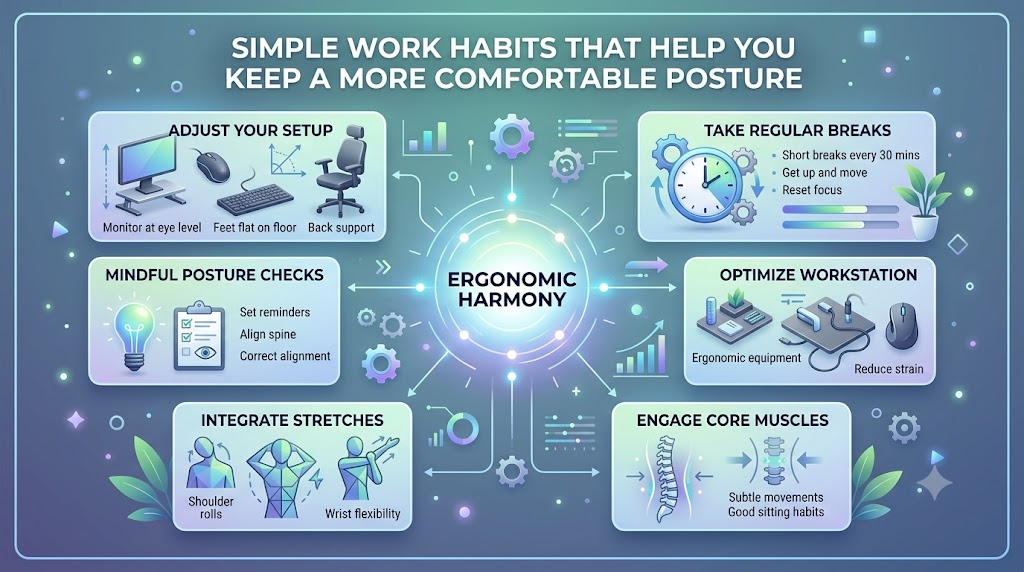
Start by making your chair comfortable. Keep both feet supported when possible. Use a footrest if your feet need extra support.
Let your back rest against the chair. Keep your shoulders relaxed. Your hips should feel comfortable while sitting.
Keep your elbows in a relaxed position. Your wrists should feel comfortable while typing. Avoid reaching far forward for long periods.Place your screen where you can see it easily. You should not need to bend your neck often. Adjust your setup when your body feels tired.
How to Set Up Your Computer Screen
A screen that sits too low may cause neck bending. A screen that sits too high may feel uncomfortable too. Find a position that feels natural for you.Keep the screen at a comfortable viewing distance. Avoid sitting very close to it. Also, avoid leaning forward to read small text.
Light and glare can affect comfort. Adjust the screen or room light when needed. This may make reading easier.
If you use two screens, place the main screen in front. Keep the other screen close by. Change your body position when your task changes.
Keyboard and Mouse Position
Keep your keyboard close enough to use easily. You should not need to reach far forward. Keep your shoulders relaxed while typing.Place the mouse close to your keyboard. Long reaching can make the arm feel tired. Move the mouse closer when needed.
Keep your wrists in a comfortable position. Do not force them into one fixed angle. Change your hand position during longer tasks.
Your work may require different hand movements. So, comfort matters more than one exact position. Adjust your setup when you notice strain.
How to Support Your Lower Back
A supportive chair can make sitting more comfortable. Let the chair support your back. Avoid sitting far forward for long periods.
You do not need an expensive chair. A simple chair can work well when adjusted properly. Your comfort matters more than appearance.Try changing your sitting position during the day. Avoid staying in one position for hours. Small movements can help reduce stiffness.A cushion may feel useful for some people. However, not everyone needs one. Choose what feels comfortable and supports your work.
Why Movement Breaks Matter
Staying still for too long can feel uncomfortable. Your muscles may become tired or stiff. Changing positions gives your body a chance to move.Stand up when your task allows it. Walk for a short time. You can also move your shoulders gently.
Look away from the screen at times. Change your sitting position when needed. Small movements can fit into many workdays.
You do not need one strict break rule. Your job and health needs may differ. The main goal is to avoid staying still for too long.
Safe Posture for Standing Work
Standing work also needs a comfortable setup. Keep your weight balanced between your feet. Avoid locking your knees for long periods.Keep your shoulders relaxed while standing. Adjust the work surface to a useful height. Change your stance during longer tasks.You can shift your weight from one foot. You can also take short walking breaks. These simple changes can reduce long periods of stillness.Standing all day is not always better. Sitting all day is not ideal either. A mix of positions may feel better for many people.
Safe Posture for Physically Demanding Jobs
Physical jobs need different safety habits. Workers may lift, carry, push, pull, or repeat tasks. Each task can place different demands on the body.Keep loads close when possible. Avoid sudden twisting while handling heavy loads. Use lifting aids when your workplace provides them.Ask for help with heavy or difficult tasks. Follow your workplace safety rules. Use equipment made for the task.Try to change repeated tasks when possible. Give your body chances to move differently. Safe work methods should match your job.
Posture While Using Phones and Small Screens
Phones can lead to long periods of downward viewing. This may make the neck and shoulders feel tired. Changing your position can help comfort.Raise the phone when practical. Avoid holding your neck down for long periods. Switch hands when that feels useful.Take short screen breaks during long tasks. Look up and change your position. Avoid keeping your body fixed for too long.
Do not treat every neck ache as a posture problem. Many factors can affect pain. Seek professional advice if discomfort keeps returning.
Safe Posture for Remote Workers
Home workspaces can create new posture problems. Some people work from beds or sofas. These places may not support long work sessions well.Try using a table and a supportive chair. Keep the screen at a comfortable height. Place the keyboard where your hands feel relaxed.Good lighting can also help. Avoid strong glare on the screen. Keep items you use often within easy reach.
Remote workers should also move often. Stand and walk between tasks when possible. A simple home setup can still support comfortable work.
How to Improve Posture Without Becoming Too Rigid
Good posture should not feel stiff. You do not need to hold one exact pose. Your body needs natural movement during the day.
Change your sitting position when needed. Move your shoulders and arms gently. Stand up when your work allows it.
Comfort, task needs, and movement all matter. A useful setup should let you work with ease. It should not make you feel trapped in one position.Try small changes instead of forcing your body. Notice what feels comfortable during different tasks. Then adjust your workspace as needed.
Common Work Posture Mistakes
Some simple mistakes can make work less comfortable. A screen that sits too low is common. So is sitting without enough back support.Reaching too far for the mouse can tire your arm. Holding a phone between your shoulder and ear can also feel uncomfortable. Staying still for hours is another common problem.Working from a soft sofa may feel good at first. But it may not support long work sessions well. Ignoring repeated discomfort can also delay needed care.These mistakes are easy to change. Start with one small adjustment. Then check how your body feels.
How to Check Your Workstation
You can do a simple workstation check each day. Start with your chair. Make sure your back and feet feel supported.
Next, check your screen. Make sure you can read it without repeated neck bending. Then check your keyboard and mouse.
Look at your shoulders and neck. They should feel relaxed rather than forced. Also check how often you change positions.
Finally, look at your movement habits. Stand, walk, or change position when possible. Small changes can make your workday more comfortable.
| Work Area | What to Check | Helpful Habit |
|---|---|---|
| Chair | Back and seat support | Adjust for comfortable sitting |
| Screen | Height and viewing position | Avoid long periods of neck bending |
| Keyboard | Distance and position | Keep hands comfortable |
| Mouse | Reach distance | Keep it close to the body |
| Feet | Floor or foot support | Keep a stable base |
When Work-Related Pain Needs Professional Help
Posture is only one possible factor in body pain. Ongoing discomfort may need a closer look. Do not try to guess the cause yourself.Seek professional advice when discomfort keeps returning. Get help if symptoms become worse. You should also seek care when movement becomes limited.Numbness or tingling needs medical attention too. Weakness can also be a warning sign. Pain after an injury should be checked.Pain that affects sleep or work also matters. An orthopedic doctor can assess your concerns. The right care depends on your symptoms and health history.
Orthopedic Care and Workplace Posture
Orthopedic professionals care for bones, joints, muscles, and related problems. They may ask about your daily work tasks. They may also ask about your movement habits.An assessment can include your medical history. It may also include a physical examination. Your work setup may be discussed aswell.Doctors may look at movement patterns and ergonomic factors. Further tests may be used when needed. Not every person needs imaging or special tests.BestOrthoHospitals.com can help readers explore orthopedic hospitals and doctors. It also provides information about musculoskeletal care. The platform does not diagnose patients or replace an orthopedic doctor.
Hypothetical Example
Hypothetical example: A remote worker notices neck and shoulder discomfort. The discomfort appears after long computer sessions.The person checks the screen height. They also adjust the chair and keyboard. Then, they begin changing positions more often.
The worker adds short movement breaks during the day. They also avoid working from the bed for long periods. These changes may improve comfort for some people.
This is only a hypothetical example. It does not show a guaranteed result. Ongoing symptoms may still need professional evaluation.
How BestOrthoHospitals.com Can Help
BestOrthoHospitals.com helps people explore orthopedic health information. Readers can learn about orthopedic hospitals and doctors. They can also explore musculoskeletal care topics.The platform covers areas such as spine care and joint care. It can also help readers explore treatment information. Rehabilitation services may also be part of their search.This information can help people prepare for healthcare discussions. It may also help them understand different care options. Medical decisions should still come from qualified professionals.BestOrthoHospitals.com does not provide a diagnosis. It does not replace an orthopedic doctor. It also does not promise pain relief or injury prevention.
Frequently Asked Questions About Safe Work Posture
What is safe posture during work?
Safe posture means keeping your body comfortable while working. It also means changing positions and moving regularly.
How should I sit while working at a desk?
Keep your feet supported and your back comfortable. Relax your shoulders and adjust the chair as needed.
Where should my computer screen be placed?
Place it where you can read comfortably. Avoid repeated neck bending or twisting.
How should I position my keyboard and mouse?
Keep both items close enough to use easily. Your hands and shoulders should feel relaxed.
Why are movement breaks important?
Movement helps you avoid staying in one position. It can also help reduce stiffness during long work sessions.
Is standing better than sitting at work?
Neither position is perfect for everyone. Changing positions may be more useful than staying still.
How can I improve posture while working from home?
Use a supportive chair and suitable table. Keep your screen comfortable and change positions often.
Can poor work posture cause back or neck pain?
Posture may affect comfort for some people. Pain can have many other causes too.
When should I see an orthopedic doctor for work-related pain?
Seek advice when pain keeps returning or worsens. Also seek care for weakness, numbness, or injury.
How can BestOrthoHospitals.com help me find orthopedic care?
BestOrthoHospitals.com helps readers explore orthopedic hospitals and doctors. It also provides information about musculoskeletal care.
Final Thoughts
Safe posture is not about holding one perfect position. Your body needs comfort and regular movement. Your workstation should also match your daily tasks.Adjust your chair, screen, keyboard, and mouse. Keep your feet supported when possible. Change positions instead of staying still for hours.Physical jobs need different safety habits. Remote workers also need a useful workspace. Small changes can make daily work more comfortable.Ongoing or severe symptoms need professional attention. Do not assume posture is always the cause. BestOrthoHospitals.com can help readers explore orthopedic health information and care options.